
Introduction
A home network is the system that connects all your devices—such as computers, smartphones, smart TVs, cameras, and printers—to the internet and to each other. Most people use a home network every day without thinking about how it works, yet understanding the basics can help you fix problems, improve performance, and make smarter technology choices.
In this guide, we’ll explain what
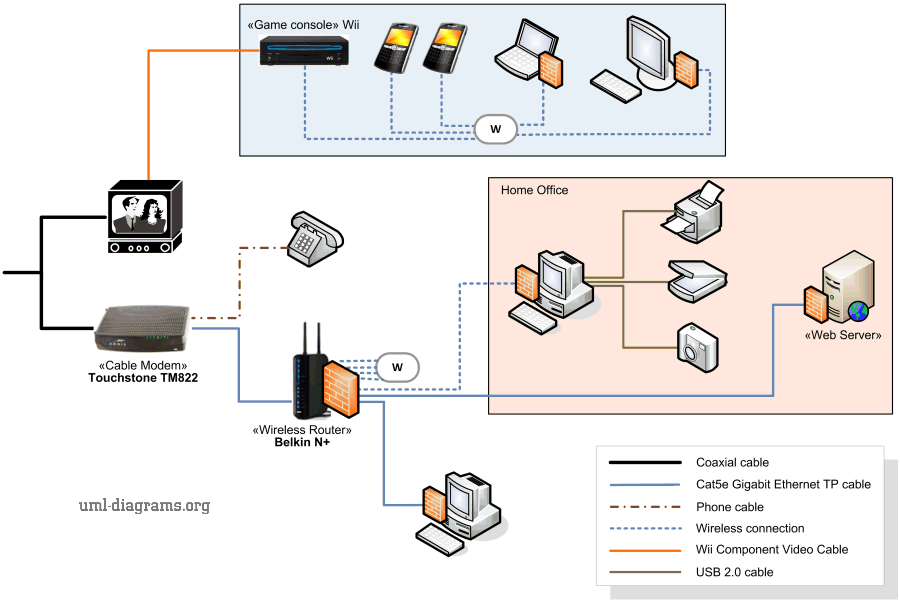
A home network is a group of devices connected together through a central point, usually a router. This connection allows devices to:
The network can be wired, wireless (Wi-Fi), or a combination of both.
Your Internet Service Provider delivers internet access to your home through fiber, DSL, cable, or wireless links.
This device connects your home to your ISP. It converts the external signal into a format your network can use.
The router is the brain of the home network. It:
Many homes use a modem-router combo, while others use separate devices.
Devices connected using Ethernet cables, such as:
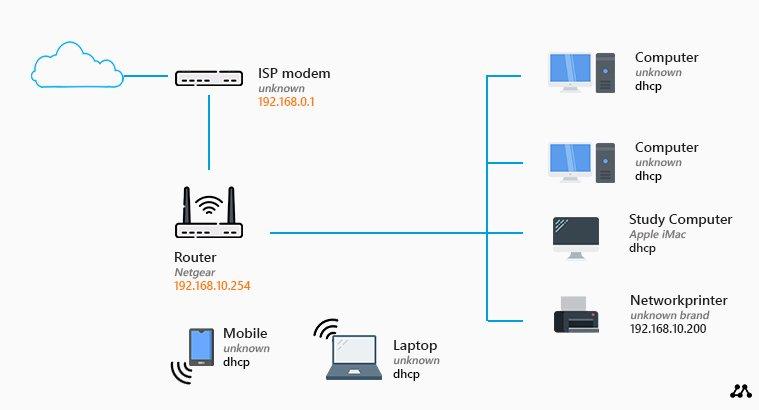
Devices connected via Wi-Fi, including:
When you open a website on your phone:
All of this happens in milliseconds.
Pros
Cons
Pros
Cons
Most modern homes use both.
A properly designed home network:
Poor network design is one of the most common causes of slow internet and Wi-Fi problems.
Understanding how your network works is the first step to fixing these issues.
A home network doesn’t have to be complicated. At its core, it’s simply a system that connects your devices and manages how they communicate with the internet and each other. With basic knowledge of how it works, you can make better decisions, troubleshoot issues faster, and build a more reliable setup for your home.
 Ahmed Ezz
Dec 25, 2025
 WiFi Eg
Dec 23, 2025
 WiFi Eg
Dec 23, 2025
 Ahmed Ezz
Dec 25, 2025
 Ahmed Ezz
Dec 25, 2025

By clicking the button, you are agreeing with our Term & Conditions