
One of the most common issues on MikroTik routers is losing internet access immediately after adding or modifying firewall rules. The router itself may still have internet access, but client devices behind it cannot browse, ping, or resolve DNS.
This problem usually appears after:
Adding new firewall filter rules
Copying rules from another router
Applying a “secure firewall” template without adjustments
Clients have IP addresses but no internet
Ping works to gateway but not to public IPs
DNS requests fail
Internet works temporarily, then stops
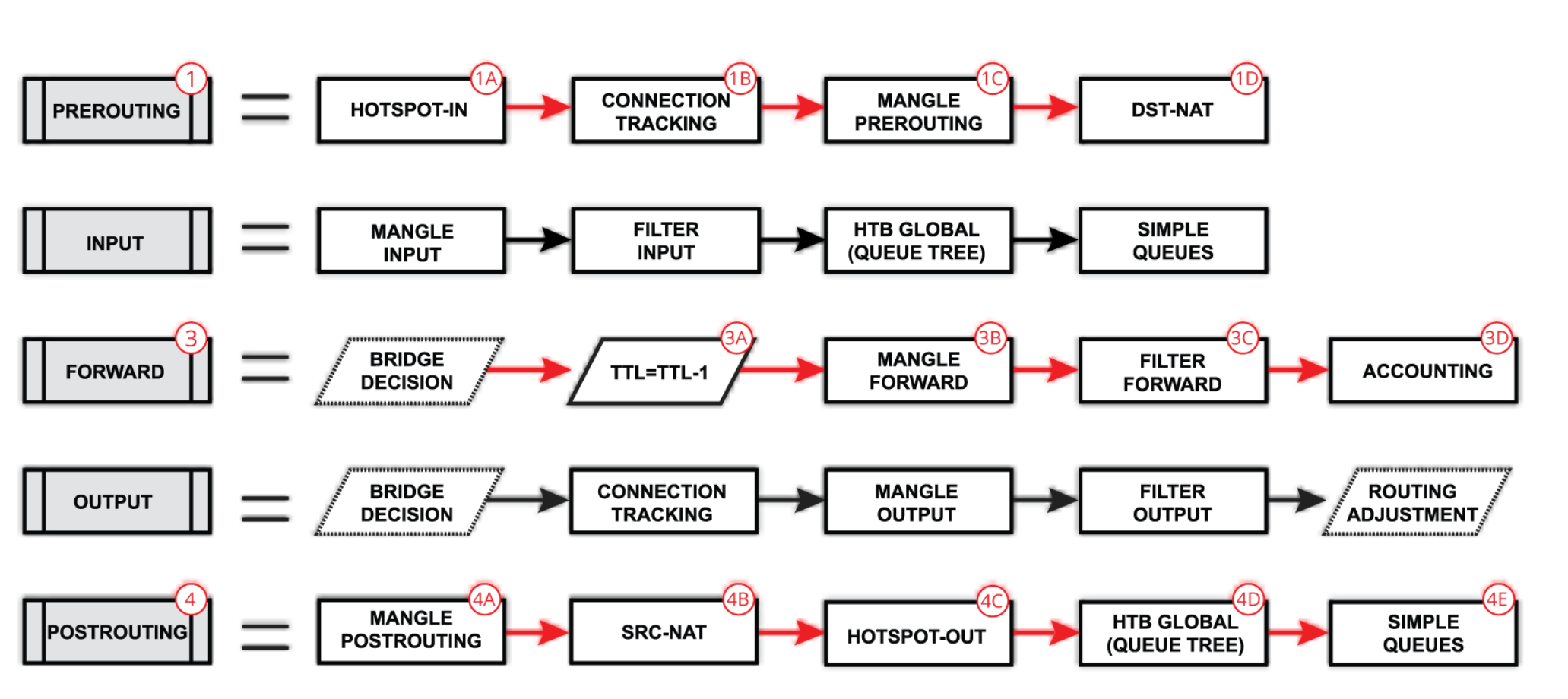
MikroTik processes firewall rules from top to bottom.
If a drop rule appears before an accept rule, traffic will be blocked.
Common mistake:
A general drop all rule placed too early.
If these rules are missing, return traffic is blocked.
Required rule:
Without it, internet will not work reliably.
Firewall rules may allow traffic to the router but block traffic passing through it.
Check:
chain=forward
Source = LAN
Destination = WAN
If firewall rules depend on interface lists (LAN / WAN), wrong assignments will break connectivity.
Verify:
WAN interface is correctly added to WAN list
LAN interfaces are added to LAN list
NAT alone does not guarantee internet access.
Firewall filter rules can still block forwarded traffic.
Always check firewall before NAT rules.
Move essential allow rules to the top:
Go to:
Confirm:
WAN = correct internet interface
LAN = bridge or internal interfaces
You should explicitly allow LAN to WAN traffic:
Look for rules like:
If found:
Narrow it down
Move it to the bottom
After changes:
Ping 8.8.8.8 from client
Test DNS resolution
Check firewall counters (hit counts)
Firewall counters often reveal the blocking rule.
Never paste firewall rules blindly
Always add logging temporarily when troubleshooting
Comment every firewall rule
Test after every change
Small changes can break everything.
Forgetting established/related rule
Blocking forward chain instead of input
Mixing LAN and WAN interfaces
Assuming NAT fixes firewall issues
When internet stops working after adding firewall rules on MikroTik, the problem is almost always related to rule order, missing allow rules, or incorrect interface lists. Understanding how MikroTik processes firewall rules makes troubleshooting faster and more effective.
Fix the logic—not just the rule.
 Ahmed Ezz
Dec 25, 2025
 WiFi Eg
Dec 23, 2025
 WiFi Eg
Dec 23, 2025
 Ahmed Ezz
Dec 25, 2025
 Ahmed Ezz
Dec 25, 2025

By clicking the button, you are agreeing with our Term & Conditions