Access Points vs Routers: What’s the Real Difference?

Dec 22, 2025 10 mins read

Introduction

Many people use the terms router and access point as if they mean the same thing. While both are related to Wi-Fi and networking, they serve different purposes. Understanding the real difference between access points and routers can help you design a better network, avoid coverage problems, and spend money only where it matters.

In this article, we’ll explain the difference in simple, practical terms.
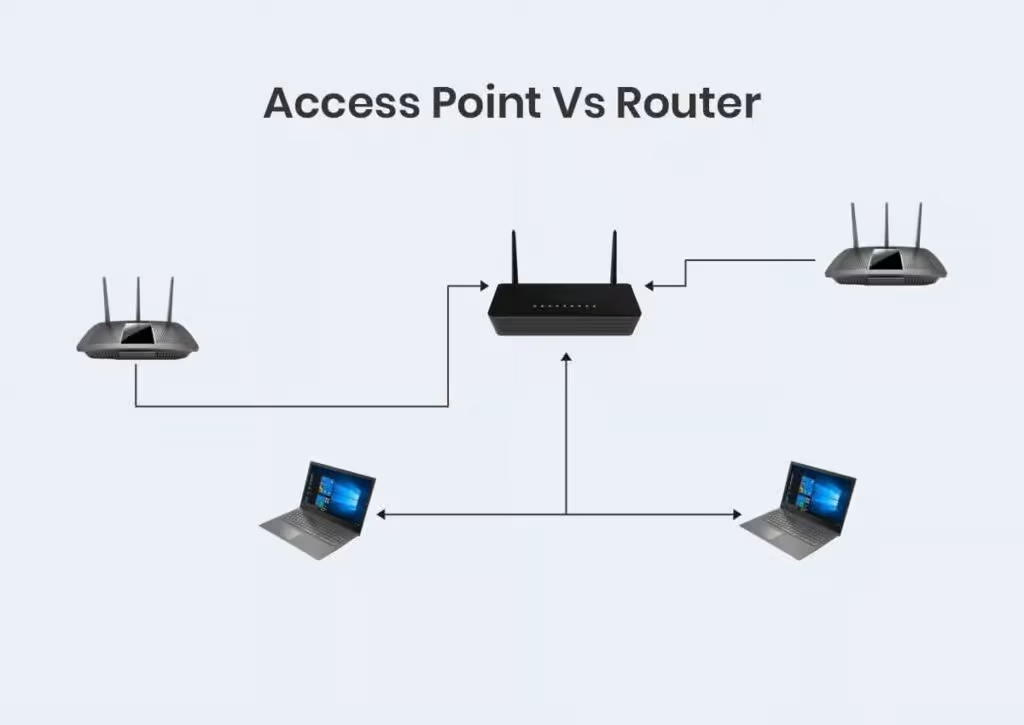
Wireless-Access-Point-vs-Router
 

What Is a Router?

A router is the central device in most home and small office networks. It connects your local network to the internet and manages how data moves between devices.

What a Router Does

  • Connects your network to the internet
  • Assigns IP addresses to devices
  • Provides basic firewall and security
  • Often includes built-in Wi-Fi

Most home routers combine routing + Wi-Fi in one device.


What Is an Access Point?

An access point (AP) is a device that extends or provides Wi-Fi coverage within a network. It does not connect directly to the internet on its own.

What an Access Point Does

  • Provides wireless access to devices
  • Connects to a router or network switch
  • Extends Wi-Fi coverage to new areas
  • Handles many users efficiently

Access points are common in offices, hotels, and large homes.


The Key Differences Explained

1. Function

  • Router: Manages the entire network and internet access
  • Access Point: Provides Wi-Fi connectivity only
  • 1-Step-by-Step-Installation-Guide-for-Wireless-Access-Points-in-SMBs-1
     

2. Internet Connection

  • Router: Connects directly to the modem or ISP
  • Access Point: Requires a router to function

3. Network Management

  • Router: Handles IP addresses, security, and traffic
  • Access Point: Focuses only on wireless connections

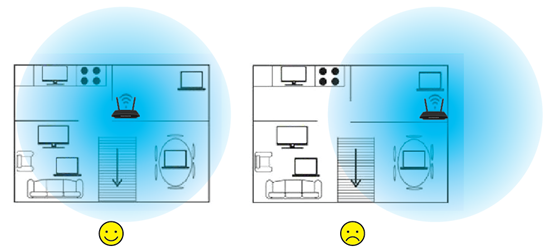
4. Coverage and Scalability

  • Router: Limited Wi-Fi range
  • Access Point: Designed to expand coverage across large areas
  • image_1604458120646y


When Should You Use a Router Only?

A router alone is usually enough if:

  • You live in a small apartment
  • You have a limited number of devices
  • Wi-Fi coverage is strong in all rooms

Most basic home setups work fine with just a router.


When Do You Need Access Points?

Access points are the better choice if:

  • Wi-Fi signal is weak in certain areas
  • You have a large home or multiple floors
  • Many users connect at the same time
  • You want stable and professional-level Wi-Fi

In these cases, adding access points is better than replacing the router repeatedly.


Router + Access Points: The Best Setup

In many modern networks, the best solution is:

  • One router to manage the network
  • Multiple access points for Wi-Fi coverage

This setup:

  • Improves speed and stability
  • Reduces interference
  • Scales easily as your needs grow

Common Mistakes to Avoid

  • Using multiple routers instead of access points
  • Placing access points without proper planning
  • Expecting one router to cover very large spaces
  • Ignoring wired connections for access points

Good planning makes a big difference.


Final Thoughts

Routers and access points are not competitors—they work best together. A router controls the network, while access points deliver reliable Wi-Fi where it’s needed. Choosing the right combination depends on your space, number of devices, and usage needs.

Understanding this difference helps you build a network that actually works instead of constantly fighting Wi-Fi problems.

Image NewsLetter
Icon primary
Newsletter

Subscribe our newsletter

By clicking the button, you are agreeing with our Term & Conditions

Live Chat Offline

Hi there! How can we help you today?

Powered by FOB Live Chat
Your experience on this site will be improved by allowing cookies Cookie Policy